

New debit card?
Here's how to continue your journey
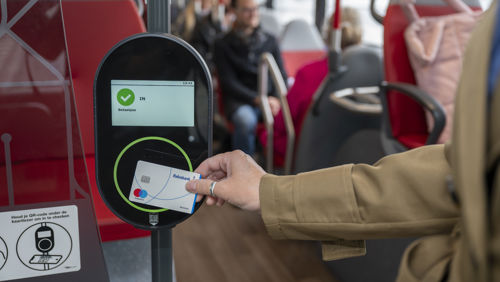
Have you received a new debit card from your bank?
Without a pass or discount, you can use it to travel as soon as your debit card is ready for contactless payments. Are you traveling with an HTM pass or an age-based discount? If so, check first what you need to do regarding your new debit card.
What applies to you?
Select your situation and go directly to the explanation. Do you have a subscription and an age-based discount? If so, review both sections.
The same bill? But a different debit card.
Be sure to note which debit card you're using. Your physical debit card and the debit card on your phone (in your wallet) are not recognized as the same card, so keep this in mind when checking in and out.
Without a subscription or discount
Use your new debit card
1. Get your debit card ready for use
Follow your bank’s instructions to activate your new debit card and set up contactless payments.
2. Check in and out with your new debit card
Hold your debit card up to the card reader when boarding. Use the same debit card when exiting. Take the debit card out of your wallet before checking in or out.
For trips without a pass or discount, you don’t need to create an account. Your fare will be charged to your account afterward.
With an HTM pass
Sign up for your new debit card
Do you have the HTM 20% Discount or Regio Vrij on your old debit card? If so, you’ll need to transfer the subscription to your new debit card yourself when you replace it. So don’t assume it will be transferred automatically.
- Look up your subscription details
Check your order in My HTM or look at your order confirmation. Verify which subscription you have and when it expires.
2. Transfer the card details yourself in My HTM
Go to “My Cards ” in My HTM. Find your old transit card and click “Replace Card.” Enter the details of your new transit card. Once you’ve entered all the information, the linked HTM passes will be transferred immediately. Check when your pass will become active on the new debit card and use that card when checking in and out. Please note: You must have taken at least one trip with your new debit card to link it.
Having trouble? Please contact customer service.


With a senior discount
Check Your Age-Based Discount
Please note: As of January 1, 2027, the senior discount for those 65 and older will be discontinued.
Are you 65 or older, or is your child aged 4 through 11 traveling with their own debit card? If so, you’re eligible for a 34% senior discount on bus, tram, and metro travel. To receive this discount, the senior discount must be added to the debit card being used.
1. View your new debit card in OVpay
Go to the OVpay app or ovpay.nl. Follow the instructions to add your debit card and check whether the senior discount is active.
2. Add the age discount if it’s missing
Follow the OVpay registration steps. Have your name, date of birth, and a photo ready.
Having trouble? You can also find help with digital questions on the HTM page about OVpay.
Link your new debit card to make a purchase
Would you like to purchase a subscription using your new debit card? To link it in the HTM web shop, use the details from a previous public transit trip made with that debit card.
1. First, take a trip using your new debit card
Take a trip by tram, bus, or train and be sure to check out.
2. Look up the transaction
Check your bank statement the next day. Write down the amount debited and the payment reference: 18 letters and numbers, starting with NLOV.
3. Link your debit card when placing your order
Enter both pieces of information when the HTM web store asks for them.
A debit card on your phone? Be careful when replacing it
Do you use a digital debit card on your phone or smartwatch? Your bank can replace this card, even if you don’t receive a new physical debit card. As a result, you might not notice the change right away. Be sure to check messages from your bank and follow the instructions to activate your new digital card.
Frequently Asked Questions
What is OVpay?
OVpay is the new way to check in and out on public transport. Check in with the new OV-pas, your debit card or credit card.
How much will my trip cost with OVpay?
As standard, you pay a basic fare and a price per kilometre travelled for each journey. These are the same fares as when travelling with an OV-chipkaart. You can also travel with a season ticket. In that case, special fares apply. More information about season tickets at HTM can be found here.
Do I need to activate OVpay?
No, activation is not necessary. You can travel immediately by holding your bank card or mobile phone against the card reader.
How does the age-based discount work on a debit card?
Please note: As of January 1, 2027, the senior discount for those 65 and older will be discontinued.
If you are between 4 and 11 years old or 65 or older, you can travel with a 34% discount when paying with your debit card on city and regional public transportation in the Netherlands. You must first register via ovpay.nl or in the OVpay app. Be sure to register even if you’re already traveling with an age-based discount on your OV-chipkaart. You cannot activate the age-based discount at HTM Service Shops.
Why is my debit card being declined?
There could be several reasons for this, but a common one is that the bank's most recent attempt to debit the cost of a previous trip from your account failed. If this happens, make sure you have enough money in your account so that the bank's next attempt is successful.
How do I link my debit card if I want to purchase a subscription?
To do this, you must first take a tram, bus, or train journey using your contactless debit or credit card. The day after your journey, you will find a reference number consisting of 18 digits and letters starting with NLOV in your bank statement.
Enter this reference number together with the amount debited during the purchase process in the webshop to link your card.
Create an account with HTM right away and you can skip this step for future orders.
An incorrect amount has been withdrawn from my account, now what?
Request a correction using this form. Is it not possible? Please contact our customer service.